Most people discover riser desks in one of two ways: a doctor mentions posture, or a coworker shows up with one and suddenly looks suspiciously more alert by 3 PM. Either way, the question that follows is the same — what is a riser desk, exactly, and is it actually worth it?
The short answer: it’s a height-adjustable platform that sits directly on top of your existing desk, lifting your monitor, keyboard, and mouse to standing height. You raise it when you want to stand. You lower it when you want to sit. Your desk stays, your furniture investment stays, and your body gets a fighting chance against eight hours of uninterrupted sitting.
But there’s a longer answer — one that covers what separates a useful riser desk from a frustrating one, which types suit which setups, and what the ergonomics research actually says versus what manufacturers tend to emphasize in their marketing.
What Is a Riser Desk
The Actual Definition — Beyond the Marketing Language
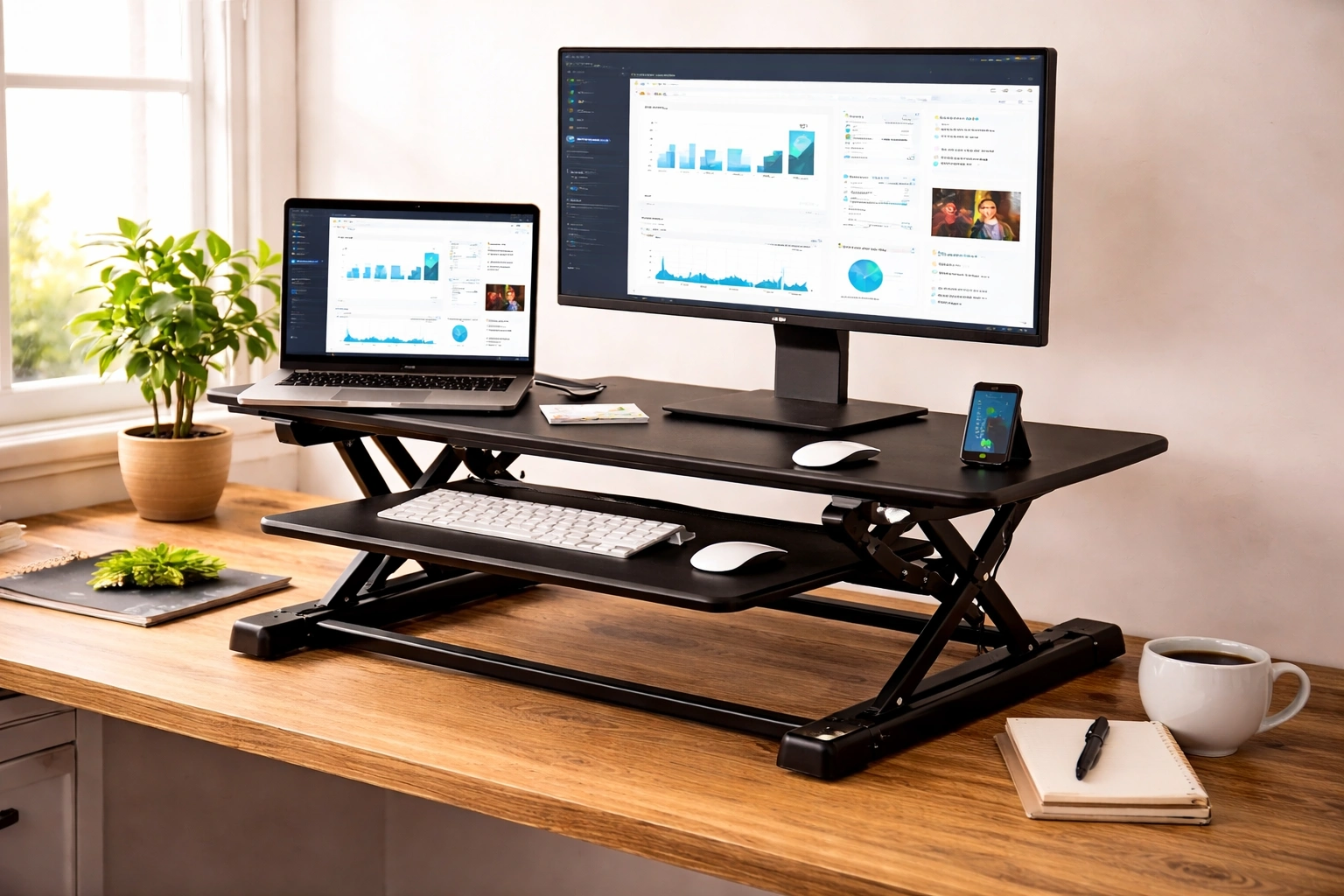
A riser desk — also called a desk riser, standing desk converter, or sit-stand converter — is an adjustable-height platform added on top of a conventional fixed desk. It converts a standard seated workstation into a sit-stand setup without replacing the underlying furniture.
What competitors consistently miss in their definitions: a riser desk and a standing desk are not the same product category. A standing desk replaces your desk. A riser desk extends it. That distinction matters for cost, installation, rental-friendly living situations, and anyone who already owns a desk they like.
The typical riser desk holds a monitor or monitors on an upper shelf, positions a keyboard tray lower and forward for proper arm alignment, and uses one of three lift mechanisms — manual, gas spring, or electric motor — to move between sitting and standing height. Most models weigh between 20 and 50 pounds and sit stable on the desk surface without any permanent attachment.
How the Lift Mechanism Actually Works
The lift system determines how often you’ll actually use the riser desk in practice. This is the detail most buyers overlook and most regret later.
Manual crank models require turning a handle to raise or lower the platform. They’re the most affordable, but the physical effort involved — particularly with a dual-monitor setup adding weight — means most users stop adjusting after the first week and leave it in one fixed position. The riser becomes furniture rather than a tool.
Gas spring (pneumatic) models are the practical middle ground. A lever releases the spring tension, and the platform rises or lowers smoothly with minimal resistance. The gas cylinder counterbalances the weight of your equipment, so adjusting a loaded platform still takes almost no effort. These are the most popular riser desk type for good reason — the adjustment is fast enough that people actually do it multiple times a day.
Electric motor models use a button or digital panel to power the platform up and down. Some include programmable height memory presets, which is genuinely useful when multiple people share a workstation at different heights. The tradeoff: electric risers are heavier, pricier, and require a power source, which limits placement flexibility.
The underlying engineering principle across all three: the platform must remain level and stable during height transition while supporting the weight of screens, peripherals, and cables. Quality gas cylinders and motor systems hold their position without drift — a riser desk that slowly sinks while you work is a sign of worn pressure components, not a design feature.
Types of Riser Desks and Who Each One Is Actually For
Single-tier risers are a single flat platform — no separate keyboard tray. Your laptop or monitor sits elevated, and so does your keyboard. The problem: when the monitor reaches eye level, the keyboard rises above comfortable typing height. This forces shoulders to elevate and wrists to angle upward, trading back strain for shoulder and wrist strain. Single-tier risers work well for laptop users who also use an external keyboard placed on the desk surface below — the screen goes up, the keyboard stays at desk height.
Dual-tier risers are the design ergonomists actually recommend. The upper shelf holds the monitor at eye level. The lower tray, set forward and several inches below, positions the keyboard and mouse at elbow height with arms at roughly 90 degrees. This two-level separation is what makes proper simultaneous monitor and keyboard ergonomics possible while standing.
Full-width risers span the entire desk surface and are designed for multi-monitor setups, wide workstations, or users who need to spread documents alongside screens. They’re heavier and less portable but offer the most usable surface area of any converter design.
Compact and portable risers are typically L-shaped or Z-shaped platforms designed for smaller desks, shared office spaces, or frequent travel. They fold flat for storage. Most don’t support more than one monitor and a lightweight keyboard, but that suits the use case — they’re not meant to be permanent installations.
Fixed-height risers (non-adjustable) raise a laptop or screen to a set elevation with no movement capability. These are monitor stands with a different name. They improve neck angle for seated use but serve no sit-stand function. The naming overlap causes a lot of buyer confusion online.
Ergonomics: What the Research Says, Not What Brands Say
The core health argument for riser desks draws from a significant body of occupational health research, but the nuance gets lost in most product copy.
Prolonged static sitting — staying in one position for extended periods without changing posture — is the actual health risk. The spine experiences disc pressure in excess of 90% more when seated versus standing, according to biomechanical studies on spinal loading. That pressure compounds over time, contributing to lumbar strain, reduced hip flexor mobility, and chronic low-back discomfort.
A riser desk addresses this not by eliminating sitting, but by making postural transitions frictionless. When changing position requires no effort beyond pressing a lever, people actually do it. The behavior change is the therapeutic mechanism — not standing per se, but the regular alternation between positions.
The 20-8-2 rule, referenced by several ergonomics practitioners, offers one framework: 20 minutes seated, 8 minutes standing, 2 minutes of light movement. Whether that specific ratio is optimal is debated, but the underlying principle — frequent, low-intensity postural change throughout the day — has consistent support across workplace health studies.
One thing most riser desk guides skip: standing for hours is also harmful. Extended static standing without movement increases varicose vein risk, causes leg fatigue, and places its own strain on the lumbar spine. The riser desk is most effective as a tool for movement variety, not as a replacement for sitting with standing as the default.
Riser Desk vs. Full Standing Desk: The Honest Comparison
Riser desks win on cost, installation simplicity, and reversibility. A quality gas spring dual-tier riser costs between $150 and $400. A quality electric standing desk starts at $500 and runs significantly higher for reliable build quality. If you rent your home or office, a standing desk requires floor space commitment; a riser desk requires nothing permanent.
Where full standing desks have a genuine advantage: total surface area. A riser desk occupies a portion of your existing desk, leaving less usable space beside it. Anyone with large physical workflows — drawing tablets, reference documents, samples, hardware — may find the reduced surface constraining. Standing desks also allow more precise height calibration across a wider range, which matters for users at the height extremes (under 5’3″ or over 6’3″) who may find riser desk height ranges limiting.
There’s also the cable management difference. Standing desks are designed with cord routing in mind. Riser desks inherit whatever cable situation your existing desk creates, and the platform moving up and down means cords need enough slack to accommodate the full height range — otherwise cables become the limiting factor on how high the riser can go.
What to Check Before Buying: Details That Determine Daily Use
Weight capacity: Dual monitors plus a mechanical keyboard plus a monitor arm add up quickly. Most mid-range risers support 25–35 lbs. Know your equipment weight before selecting a model, not after.
Height range: The relevant measurement is standing height from floor to keyboard tray, not the riser’s adjustment range alone. Your desk height plus the riser’s lowest position equals your seated keyboard height. Your desk height plus the riser’s maximum position equals your standing keyboard height. Both numbers need to match your body — not the product’s average user.
Keyboard tray depth: Shallow keyboard trays force the mouse to sit beside the tray on the riser’s upper surface, which places it several inches higher than the keyboard. That elevation difference creates shoulder asymmetry. Look for trays at least 20 inches wide and deep enough to position keyboard and mouse on the same level.
Stability at height: Any riser desk will wobble slightly at maximum height under lateral force — that’s physics. The question is whether the wobble is within tolerable range for your typing style. Heavy typists and mechanical keyboard users should test stability at full extension before committing to a model.
Footprint on desk: Measure your desk surface before selecting. The riser’s base dimensions plus clearance for the platform to move down without hitting monitors or peripherals on the desk beside it should be mapped out in advance.
Workspace Scenarios Where a Riser Desk Works Best
Riser desks perform particularly well in a few specific contexts that don’t always get mentioned:
Shared workstations in offices — where multiple employees of different heights use the same desk at different shifts. A riser with memory presets eliminates the manual recalibration every time.
Rental apartments and co-working spaces — where permanent furniture modifications aren’t allowed and a standing desk isn’t a viable option. The riser installs and removes without any tools.
Post-injury rehabilitation setups — where a physical therapist has recommended reducing seated hours but a full standing desk isn’t yet justified. The riser provides a low-commitment, low-cost way to test whether sit-stand behavior actually helps before making a larger investment.
Older adults returning to desk work — for whom prolonged sitting after sedentary periods creates faster fatigue. The gentle encouragement to stand periodically, with minimal effort required, fits into existing routines without disruption.
The Overlooked Accessories That Make a Riser Desk Actually Work
A riser desk in isolation addresses height. What surrounds it determines whether ergonomics actually improve.
An anti-fatigue mat is nearly essential for extended standing periods. Standing on a hard floor without cushioning accelerates leg fatigue and foot discomfort, which causes people to shift posture in compensatory ways that undo the benefits of standing. Gel-core or foam anti-fatigue mats designed for stand-at-work use are different products from kitchen or utility mats — the cushion density is calibrated differently.
A monitor arm frees the riser’s upper shelf for other equipment and allows independent monitor height and tilt adjustment independent of the riser’s position. It’s particularly valuable in dual-monitor setups where the riser’s shelf may not position both screens at ideal angles simultaneously.
A cable management system — specifically a cable sleeve or tray that accommodates slack — prevents cords from limiting the riser’s height range. It’s a small investment that eliminates a persistent daily irritation.
Bottom Line
A riser desk is one of the most practical, low-friction ergonomic upgrades available for a desk-based work environment. It doesn’t demand new furniture, significant space, or any permanent commitment — it adapts to what you already have and gives your body the one thing prolonged sedentary work consistently denies: the option to change positions without disrupting workflow.
The key is treating it as a movement tool rather than a standing replacement. Use it to alternate, not to stand all day. Match the type — single-tier, dual-tier, gas spring, electric — to your actual setup and height requirements, not to what’s cheapest or most reviewed. And add the anti-fatigue mat. Almost no one mentions it; almost everyone who skips it regrets it within two weeks.
If you work at a desk for more than five hours daily and haven’t already addressed postural variety in your setup, a riser desk is one of the highest-return adjustments you can make.




 News2 years ago
 Lifestyle4 years ago
 Lifestyle4 years ago
 Wealth2 years ago